Blog

  • Looking for a FREE Online Keyword Research Tool?

    Looking for a FREE Online Keyword Research Tool?

    Wikipedia Keyword MiningEverybody loves FREE and so it is good to find something which is not only free but does a job that you actually need – keywordpredator.com is one of those rare creatures – as long as you use it properly instead of just expecting it to do what every other tool already does! Read on for the nitty gritty..

    When you are in the internet marketing or SEO business, or in fact any business with a web site, you will be spending rather a lot of time on keyword research and for that you will most likely be using one or in fact several tools to help find those nuggets of keyword gold. If you are not actually doing any keyword research then it’s about time you got your act together and start doing some as it is fundamental to any web based venture!

    So Many Tools, So Little Time

    There are many good tools around which you can and should be using to automate as much of the research process as possible because it’s no secret that the research process can be long and tedious. There’s no escaping it though if you want to succeed, you have to bite the bullet and take the time required to do the job right. The amount of time involved can be significantly reduced through the use of tools but it will still take a while no matter what – nothing beats the “Mark I Eyeball” combined with the human brain for picking out the winning keywords from huge automatically generated lists.

    Wikipedia Mining

    Most keyword research tools rely on Google, one way or another, to produce their keyword suggestion lists and stats and this is fine up to a point – the point where everybody else is using the exact same tools as you and ends up finding the same keywords as you which of course leads to more competition and less money in the bank for you. However there are other methods for keyword discovery and one such method is mining Wikipedia for related keywords – that site is a treasure trove for top quality articles and contains bazillions of keyword relations which you can utilize.

    Mining by Hand

    You can manually search for wikipedia articles in your chosen niche – obviously the nature of Wikipedia means you can’t always search for too narrow a niche or geo-targeted keywords, for example something like ‘new york dentist’ will not work at all on Wikipedia since nobody would ever write a Wikipedia article about that. However it will of course have plenty about dentistry and about New York but not specifically those two combined.

    Once you find an article relevant to your niche, Dentist for example, you will see there are loads of links to other pages – each of these links is a highly relevant keyword which you can copy and paste into your list or spreadsheet for further analysis. You can then click each of these links and find even more related keywords – you can keep doing this as often as you need to build up a huge list of really good keywords. Just keep drilling down through all the links on all the related pages and copy/paste the keyword from the links.

    Now alone these keywords can be great but if you click the View history tab at the top of each page you will see there a link for Page view statistics so you can see just how popular or how much interest there is in that particular article topic – this is great info as you can use it to quickly assess the potential worth of a keyword. Normally you would copy those stats into your keyword spreadsheet as mentioned above so you can later sort them all based on the view stats. However all this manual digging through Wikipedia pages and copy/pasting keywords and stats is a lot of work, is there a better way? Why yes, finally there is a better way..

    Automatic Wikipedia Mining

    A new keyword discovery and research tool called Keyword Predator makes it really easy to dig through all that great Wikipedia data and all you need to do is enter a seed keyword (a broad one, not localized due to the Wikipedia limitation previously discussed) and then click click click to drill down through all the suggestions and add the good ones to your own private keyword database. Once a keyword is added to your list it is then automatically analysed and a whole load of additional data is pulled in from various places across the web.

    The end result is a great list of keywords with data such as Social Competition, CPC, Difficulty rating, Domain availability and more so you can easily pick the best keywords for your articles or for entirely new sites. How much does all this wiki mining wizardry cost? Nothing – it really is free!

    So what are you waiting for? There’s gold in them thar Wikipedia hills! Go and dig it out now!

  • I Tried this Viral Content Marketing Trick and You Wont Believe What Happened Next!

    I Tried this Viral Content Marketing Trick and You Wont Believe What Happened Next!

    Viral Content MarketingThere’s a lot talked about viral content marketing on the web these days but you probably think from the title of this article that the trick I am going to tell you about is some kind of strategy which involves catchy viralnova style titles, right? Well that certainly does have its part to play but there’s more to it than that, much much more and the real meat of the trick is a dark and dirty secret of content marketing, something that really makes it work and separates the men from the boys or women from the girls if you like or to be extra PC the responsible adults from the reckless kids.

    In short the secret is what is known as paid amplification and I’ll explain much more in this article about what that means and how you can use it, so read on to get the details and learn how shockingly powerful it actually is.. you will be amazed and you may even cry! 😉

    The Old Way

    So a fairly typical plan followed by many, possibly including you, when writing and promoting a new article goes something like this..

    1. Keyword research to find a topic worth writing about (ie. gets plenty of google traffic) and not too hard to rank for.

    2. Write a 500 word (or whatever length you decide on) article around the chosen keyword (or phrase) and include it in the title, meta tags, image tags, the body of the article and maybe a few other places too (while being careful not to fall victim to keyword stuffing).

    3. Publish your article on your site, ping it and then post a link to it on Twitter and Facebook in the hope that it will go viral.

    4. Possibly do some “blogger outreach” – not just sending it to your mum!

    5. Try to get some backlinks through various means.

    6. Check Google every hour to see if it has been indexed yet and watch for it to rise in the serps.

    7. Sit back and watch those traffic stats as the visitors flood in!

    A week, two weeks, a month later and still no viral love and just a trickle of traffic.. you just assume that’s the way it goes and so you will just try again with a new article and another new one and another and surely eventually your time will come and one of your articles will finally go viral!

    Only it doesn’t.

    Sure your traffic may well be slowly creeping up, you’ve been posting quality content regularly, you’ve made fancy infographics, informative videos and great articles.. you’ve followed all the guidelines, you’ve been tweeting madly, you’ve been posting comments on relevant blogs and forums and you’ve been trying to get known by the influencers in your industry.

    The Long Game

    All these things (and more) certainly do work but that’s the long game.. for many people that may be fine, your blog is your passion, your hobby, you don’t care about going viral, you do it for the love of the game and over the years you will build up an enthusiastic audience if you keep producing the good stuff and engage them. Eventually you will have enough traffic to make some money from it, possibly even a lot of money. If you are really focused and work really hard on your content marketing and all your ducks are in a row, you may be able to reduce this to a matter of a few months before you see a decent amount of success. If you are an SEO wizard or wear a hat of a darker shade, you may even be able to do it much sooner, however not everyone can do it that way or even wants to. There is of course more than one way to do it, as Tim Toady says.

    But what if you really need to make it now? You’re trying to start a business and that means it has to make money as soon as possible, even more so if you’re financed by OPM (Other Peoples Money) or the Bank of Mum & Dad and they demand results sooner rather than later, or if  you need to pay the rent next month or put food on the table.

    Is there a shortcut? In a word.. YES!

    The content marketing secret that every online marketing agency knows and which every marketing professional in successful companies knows.. you have to pay to play. It really is that simple. Of course it is not just a matter of paying for some advertising to send traffic to your site in the hope that it will convert, that is a different kettle of fish and not what this article is about.

    The Secret to Success

    The real secret to viral content marketing is what is known as paid amplification. In other words you pay to amplify your content, to extend its reach on the web, on social networks, wherever the people are who can spread the word for you. Unless you are incredibly lucky or well connected, the only sure(ish) way to make your content go viral is to make sure that enough people see it to start the ball rolling.. you have to overcome the inertia somehow, to reach that tipping point where it is being shared by enough people to take on a life of its own.

    Of course just throwing money at the problem is not going to fix all the worlds problems, or even just yours, if your content sucks then nobody will share it and so it will only be seen by those you’ve paid to reach.. that may be enough for some people but you’re just putting lipstick on a pig which is a wasted effort (unless you have a thing for pigs). Quite simply if you’re going to spend money on paid amplification you better make sure the content you are amplifying is top notch unless you have money to burn. There is no point doing this for a basic 500 word article you just whipped up (or outsourced) and threw out there. Take the time to plan and create something really good, something actually shareable both from a quality and technical point of view. By technical I mean you include things which make it easy and likely for people to share.. social sharing buttons, appropriate calls to action and psychological triggers etc.

    Make your content awesome and people will want to share it – if they know about it. Again this is why you need to pay to amplify – too few will know about it otherwise and so your chances of going viral are massively reduced. You need to seed your content widely and appropriately.

    So how exactly do you amplify your wicked content?

    Well as above, Tim Toady applies here too but I will outline a few methods and places you can go to for paid amplification. It is really quite simple and not even that expensive – you do need to have funds available for this method but we’re not talking millions here, you can start with a small amount like $50 or even less if you just want to test the waters before jumping in but for as little as $200 you can have massive reach which can quickly springboard you to success.

    Everyone online should know about Reddit by now and it is a great source of free traffic if you approach it right but there are strict rules in place about self-promotion there so you walk a fine line when using it for traffic generation. However they also provide an advertising platform which works very nicely for getting the word out. It takes the form of a paid post which means not only do you get your link on Reddit but people there can actually comment on it so you can directly engage with them which makes it much more likely they will take notice an even share your link with others on Reddit and of course elsewhere.

    You’ve surely seen Outbrain links even if you didn’t know what they were – at the bottom of bazillions of news articles there will be a list of possibly related content on other sites. Those are put there by Outbrain (amongst others) which is a paid discovery service and which you can use to put your links on loads of high traffic sites such as CNN. Yes you can actually have your article linked on major sites like CNN!

    Another paid content discovery service is Taboola which also has massive reach on a network which includes some of the biggest and most prestigious sites online such as Time.

    Disqus is a popular commenting plugin used on millions of sites, often replacing the commenting section on blogs for example, and as such this provides them with millions of places to place links or ads. They call it promoted discovery but by now you will get the idea so I wont dwell on the details.

    But wait, there’s more.. in case you didn’t have enough places for paid content discovery, have a look at Zemanta! Their content and link suggestion system can push your links out to millions of people.

    The Social Networks

    Besides the above content discovery platforms there are of course the big social networks which also sell advertising. The biggest of which these days is Facebook and fortunately they have a self-service advertising system which you can use to quickly “boost” your articles to a very targeted audience. Rumour has it that it costs less to show your ads to people who are already your “fans” so it can be worth building up your Facebook page first – but it is extremely important to make sure all the Likes you get are from real people who are actually interested in your content – Facebook will actually reduce your exposure on the network if their system detects low engagement and of course buying cheap (ie. untargeted or in particular fake) likes will kill your reach and end up costing you much more!

    Twitter is also a great place to amplify your content and their self-service ad system is being gradually made available in other countries besides the US and a few EU countries so go check them out – their promoted tweets are an excellent and affordable way to get the viral buzz started!

    Also on Twitter you can buy credits on services such as JustReTweet which will get your tweets retweeted by loads of people – imagine 1000 people retweet your message and they each have 1000 followers on average.. that’s 1 million people on twitter that will see your tweet!

    Stumbleupon is a smaller social platform but also a great way to get eyeballs on your content by means of what they call “paid stumbles” which cost about 10 cents each and can easily end up with many more as people push your link out to their networks.

    Retargeting is a great way to maximize your ad spend. While not strictly speaking a paid amplification method, what it does do is give you a second (and third and..) shot at converting all the traffic you got as a result of your big amplification campaigns. How it works is simply showing your ads to people who already visited your site – in other words when someone came to read your content then left without buying or registering, you can show your ads to them when they are on other sites. Since they already saw your site they are familiar with it and will more likely notice your ads and be more inclined to come back.

    Putting it all Together

    Using all the above systems you can extend your reach to literally hundreds of millions of people, limited of course only by your budget. However even with a relatively modest budget you can reach a huge number. For example with Outbrain they recommend paying 15 cents per click – you can of course pay less but you may get less exposure so you have to experiment to find the sweet spot for your content. But lets say you are paying 15/click on average and lets say you get a click through rate of 1%, that means for just $15 your link/snippet is going to be seen by 10,000 people and you will get 100 actual visits (ie. clicks) to your site from those 10k. The actual CTR could be very different, you could get 100,000 views for those same 100 clicks, it really depends. Needless to say you should try to maximize your return on that – it doesn’t have to be just based on clicks – 100k people seeing your article snippet along with domain/site name for example is a nice way to get some branding.

    Of course you need to carefully craft your article titles and snippets and/or visual media previews to get the most benefit from all this content amplification activity. You could and indeed should take a leaf from Upworthy and write something like 20 versions of your title, then split test them and only then choose the best one to run with. To test them you can just do small runs of a few thousand views on several platforms and keep tweaking and testing until satisfied with the response rate.

    Paying for ads of any kind is a quick way to lose your shirt if you are not careful so you must, I repeat MUST, make sure to carefully target your ads – don’t just go for the quick fix “click to boost” types ads that Facebook and others offer to the unwary. Dig deep into their targeting options and test small scale campaigns while learning the system before expanding your campaigns to extend your reach further.

    Get Coupons

    Here’s a quick tip – if you are a namecheap customer, they actually have a page of deals which offers all sorts of freebies such as $50 Twitter advertising coupons and even a $150 retargeting coupon which is a fantastic offer. All you need is to be a namecheap customer so if you are not yet then go now and register a domain or get some cheap hosting so you can take advantage of the coupons and discount codes they offer – the more you spend at namecheap the better the deals you get (ie. you get more!) but you don’t have to spend much to get some great deals. They also have other deals besides advertising coupons, such as free content (stock photos) you can use on your sites and more so it is well worth it. Using these coupons allows you to test the waters with paid content promotion without risking your own hard earned cash, so you can now easily and safely learn the ropes before moving to the big leagues.

    Hopefully you will find the above tips useful, just make sure to test everything carefully and make a plan of action which you can follow each time you publish great content. Do you have any favourite places or methods to amplify your content? Feel free to share in the comments section below.

  • Glossary of Common SEO, Internet Marketing and Technical Terms

    Glossary of Common SEO, Internet Marketing and Technical Terms

    seo internet marketing glossaryTo accompany our internet marketing guide for the bewildered, here is a glossary of common terms, technical words and general jargon which will hopefully clarify many things for you as you embark on your internet marketing journey to riches and global domination.

    Affiliate – a member of an affiliate marketing program.
    Affiliate Program – a marketing system whereby affiliates send traffic to a site and get paid a commission for sales resulting from that traffic. Amazon.com runs a popular affiliate program.
    AJAX – an extension to javascript which allows web page content and database updates without the need to reload the page each time.
    AWS – amazon web services, the “cloud” services system offered by Amazon.com

    Backlinks – these are links on other sites which link back to your site and thus help drive your site up the ranks in Google. This of course makes them extremely important for an internet marketer (unless PPC is your thing).
    Backup – you need one. Keep a copy of your data, preferably tracking changes, in a secure alternative location.
    Blog – a simple website or “web log” typically with posts appearing in chronological order.
    Cache – makes sites load faster by storing pre-created pages or frequently accessed content to minimize processing and database access.
    Captcha – those annoying graphics showing some random characters you need to type in on many web site registration forms to prove you are human.
    CDN – content distribution network, makes sites load faster by caching files around the world where they are closer to the end user.
    Cloud – a buzzword referring to doing things, such as storing data, online using a cloud service. In web hosting terms this is similar to a VPS but with billing usually by the hour and the ability to start and stop multiple instances as required.
    CMS – content management system, a web application which makes it easy to build and manage a dynamic web site such as a blog.
    Coupon – in internet marketing you will typically be interested in Adwords coupons, Facebook coupons, Twitter ads coupons and often also hosting coupons or discount codes.
    CPA – cost per action, in advertising this is the cost you pay for a certain action.
    CPC – cost per click, in advertising this is the amount you pay for each click on your adverts.
    CPM – cost per mille, in advertising this is the cost you pay per 1000 views of your advert (instead of paying for CPC)
    CSS – cascading style sheets, a way to define styles used on web pages to make them look nicer.
    Database – a system for storing and retrieving data, such as MySQL.
    DNS – domain name system which maps internet addresses to servers.
    Domaindomain name, the easy to remember address which represents the hard to remember IP address of a website or other internet service.
    Double Opt-In – the act of verifying (typically by clicking a link that was mailed to you) that you really did submit your email to a mailing list – helps to prevent abuse.
    eBook – enter your email in the box on the right and you can see one!
    Email Blog – an ezine or email newsletter.
    EMD – exact match domain, a domain name which consists of the main keyword/phrase the site will
    target.
    Ezine – an email newsletter or email blog.
    FTP – file transfer protocol, a method for uploading/downloading files to a server, not very securely.
    HTML – hyper text meta language, a simple language used to construct web pages.
    IM – internet marketing (also instant messaging), what you are or will be doing if you read this site!
    IP Address – an address for a server, a series of 4 numbers, separated by dots like: 192.168.1.123
    JS – javascript, a client side language (runs in your browser) used to add dynamic features to a website.
    Keyword Planner – a keyword research tool provided for free by Google as part of Adwords.
    Lists – mailing lists, a list of people who have subscribed to a mailing list/ezine.
    Long tail – typically keyword phrases representing micro niches which alone may not get much interest but when many long tails are targeted they add up and can be quite profitable with high conversions due to their highly focused nature.
    LSI – latent semantic indexing, from an SEO point of view it regards using synonyms of primary keywords to help clarify the meaning of a page without resorting to keyword stuffing.
    MySQL – a relational database server application, used by countless web applications such as wordpress.
    Nameserver – a DNS server, every domain needs at least two nameservers.
    Off-page SEO – basically creating discussion about and backlinks to pages and sites for SEO purposes.
    On-page SEO – optimization of pages on a site for the search engines, one side of SEO.
    Opt-In – the act of submitting an email to a mailing list.
    PDF – a popular document format.
    Perl – a programming language used on the web but particularly good for text processing and backend tasks.
    PHP – a programming language widely used on the web.
    PMD – partial match domain, similar to EMD but consists of more than just the exact keyword.
    PPC – pay per click advertising, Google Adwords is probably the most popular ad network where you can buy PPC ads.
    Proxy – a server through which requests are sent (such as fetching a web page) which can mask the real ip address of the person or machine making the request. Commonly used for SEO and keyword research software.
    SCP – secure copy, a file copy program which runs over SSH.
    SEO – search engine optimization, a combination of on-page and off-page optimization techniques to get a site ranked higher in search engine results.
    SFTP – a secure implementation of FTP.
    SMTP – simple mail transport protocol, basically an outgoing mail system.
    Solo Ad – an advert in the form of an email sent to a mailing list by the list owner.
    Spinning – a method to produce many variations from one article by replacing words/phrases with synonyms, typically from spintax format.
    Spintax – the format used when creating articles for spinning, eg. “the {black|white|pink|large|angry|hungry} {cat|dog|horse} {ran|walked|jumped|died|grew wings and flew away}”. Spinning and creating spintax is usually done with special software unless you are a masochist or some kind of mad genius.
    SSH – secure shell, a method for making secure, encrypted connections to servers.
    Themes (wordpress) – designs which can be easily installed to change the entire look of a site.
    UD – ultimate demon, a very powerful and popular automatic backlinking application for SEO which will save you months of tedious manual backlinking work if used properly.
    UNF – ultimate niche finder, a useful keyword research application.
    VPS – virtual private server, in web hosting this is functionally like a dedicated server but in fact several VPS instances can run on the same physical server.
    Whois – an internet tool for looking up the owner of a domain name.


    Hopefully the above will be useful and we will be adding more over time but if there’s anything missing, let us know!

  • Internet Marketing for Newbies: an in-depth guide for the bewildered and technically challenged

    Internet Marketing for Newbies: an in-depth guide for the bewildered and technically challenged

    Internet Marketing for NewbiesThe purpose of this article is not to teach you specifically how to make money online, it is to present the fundamental knowledge required before you can even start building an internet based business with which you could then hopefully make money. It will explain the terminology in simple, clear language. It will tell you what basic infrastructure, software tools and utilities and web based services you need and perhaps even more importantly – what you actually don’t need right now (but may need in future).

    The knowledge presented here should enable you to go from zero knowledge, beyond the ability to use email and browse the web, and take you to a point where you will better understand what is talked about in more advanced internet marketing or ‘make money online’ guides you may find online and that includes the tips and tricks and methods presented in the “Bank of Home” ezine.

    After you have completed reading this you should be better able to make informed decisions about your future internet marketing activities, choose the right software and services and not waste money on things you simply do not need right now, while also helping you to not waste valuable time doing things the hard way when there is a faster and/or better system you could be using. So let’s get started..


    Domains

    Perhaps the most fundamental of all fundamentals for web users and internet marketers is the domain name. Every server (computer) on the internet has an address called an IP address which is just a series of numbers and dots such as 192.168.1.123 which is not exactly easy to remember so the domain system was created to add user friendly names instead. So for example google.com is simply an easy to remember address which behind the scenes maps to an IP address (actually a great many ip addresses but that is not important for you now).

    Domains have what are called ‘extensions’ which in the case of google.com is the ‘.com’ part. Traditionally .com was for commercial web sites (and is the most popular) while .org was for organizations and .net was for techy stuff. These days people grab whatever they can get because all the good names were taken years ago.

    As well as the big three extensions there are also country extensions such as .co.uk for United Kingdom, .ie for Ireland, .us for United States etc. and even .eu for European Union. There are also others such as .biz and now a whole array of new extensions is being created. So there is in fact a huge choice of domains and extensions which you could use (subject to trademark restrictions and such like).

    To get a domain for your own site you simply go to a domain registrar such as Namecheap and use their search form to find an available domain (which can take a while!) then when you find one you like which is available you register it there and pay a small fee of around $10 – it is important to understand that you only ‘own’ that domain for as long as you keep paying for it and that $10 fee is per year.

    Once you have registered your domain name you need to point it to your web site, wherever that may be. To do this there is a system called DNS or Domain Name System which just maps easy to remember domains to hard to remember IP addresses. Any time you type in a website address in your browser, such as http://google.com, your browser is actually doing a DNS lookup (often cached)  to find out where the actual location of that site is on the internet so it can present you with the content hosted and served from there. DNS is actually a distributed system and DNS records (the thing that translates your domain to your IP) are propagated around the net and can be cached locally by your ISP for example to enable faster domain name lookups.

    Your web site hosting company will tell you what IP you can use and it may be dedicated to you alone or it may be shared with other users on the same hosting server. You will need a minimum of two DNS servers (also called nameservers) to point your domain to an IP – this is to ensure if one DNS server crashes, your site can still be reached.


    Web Hosting

    When you’ve registered your domain name you need to point it somewhere, a place where your actual web site will be “hosted” on the internet – for this you need a web host. Hosts usually provide a number of options going from the simplest shared hosting account to the full dedicated server.

    Shared hosting – this is the cheapest and simplest option and consists of an account on a server which is shared with many other people. It is basically just a directory on a computer where you can upload your web site and related files. Then your domain is pointed to that directory and you can usually install wordpress and many other web applications through a simple site management interface (control panel). Shared hosting will also usually provide you with email accounts using your own domain and a database (MySQL) and file uploads would typically be done using an FTP application (file transfer protocol) or through the web based control panel.

    Shared hosting accounts are somewhat limiting but they do hide much of the complexity of managing your own web site or server and as such they are useful for beginners or anyone who simply wants to get a site online with the minimum fuss but who does not require the deeper level of access and control provided by more advanced hosting packages.

    VPS – a Virtual Private Server is the next step up the hosting ladder and well worth getting. It is still sharing one server between many users (but less than the above type) however it provides all the functionality, access, security and control that a full dedicated server provides but for less money. With a VPS you have what is called “root access” which means you can access the superuser or administrator account on the server and you usually use an SSH application (secure shell) to login instead of FTP. SSH is much more secure than FTP and gives you command line or console access where you can run commands, install software and of course break stuff.. 😉 You may also have a control panel which in most cases allows you to avoid the somewhat riskier and more complicated SSH access method to manage your server although more experienced server admins generally prefer to use SSH and the command line.

    Cloud – “the cloud” is a buzzword these days but functionally a cloud “instance” as far as hosting is concerned is pretty much the same as a VPS with the major difference being you pay by the hour and you can create (and shutdown) multiple such instances at the press of a button which allows for sites to scale up when traffic rises and scale down again when it drops. Cloud hosts usually offer all sorts of additional cloud services for more advanced uses such as load balancers, databases and more. Probably the biggest and best known cloud services provider is Amazon with their AWS system. While cloud hosting is certainly convenient it can actually cost much more than just a regular VPS or other monthly server rental so don’t go rushing head first into the cloud just because it’s cool – crunch the numbers to see if it is worth the cost for what you need.

    Dedicated Server – when you outgrow (or plan to) your VPS a dedicated server is the likely next step. You rent an entire server just for your use – nobody else has access to it (although your host could gain access if they needed and of course the NSA!) and none of the resources it provides are shared with anyone else. Your server is hooked up to the network either with a 10Mbps, 100Mbps or sometimes even 1Gbps connection and hosts will often say you get “unlimited bandwidth” subject to the size of the network connection your server has, in reality the small print will likely have a fair usage restriction or something like that, however the cap will still be quite high and most people will not ever manage to use it all.

    Co-Location – this is basically the same as a dedicated server except you actually own the server and instead just pay for “rack space” and network connection in a datacenter. A datacenter is a hosting facility where thousands or sometimes even tens of thousands of servers are stacked in racks and connected to the internet. Rack space is usually priced in units of “U” with servers typically being 1U, 2U, 4U or sometimes more and a full size rack will contain up to 42U although not all of that will be used for servers as other networking equipment may also be there such as routers, switches, power strips and others. Note also that these days you can get high density systems with multiple servers squeezed into each ‘U’.

    Control Panels – servers can be complicated to manage which is why sysadmins get paid lots of money, however most web hosts these days offer web based control panels which make the whole process much simpler. Panels such as WHM/CPanel, Plesk, Webmin and several others are commonly offered although mostly for an additional fee. With a good panel you rarely, if ever, have to deal with the command line and logging in with SSH or anything techy like that.

    Operating Systems – hosts offer servers with a range of operating systems but for the most part there are two main offerings: Linux and Windows. Within each there are multiple variations such as Centos Linux v6 or Windows Server 2008 Web Edition. It can be somewhat confusing with all the strange variations but my advice would be this: for hosting your website you should choose Linux and preferably the latest version of Centos (currently v6) or perhaps Ubuntu Server.

    A common use for Windows Server amongst internet marketers is just as a remote “always on” desktop to run various internet marketing research and SEO software such as the excellent Ultimate Demon – these are programs you might normally run on your own windows PC but since they can run attended for days or weeks performing scheduled tasks it is better to simply rent a VPS with Windows and install all your marketing applications there so you don’t need to leave your own PC running all the time using precious computing power, electricity and bandwidth by constantly running such apps.

    Once you have chosen a server or hosting you will need to configure it and install any software you require. For web sites this typically means you need a LAMP configuration – LAMP simply means Linux, Apache, MySQL, PHP/Perl/Python which form the basic technology stack for a web server. You don’t usually need to worry too much about the details as your host will frequently provide such a stack pre-installed (certainly if you choose shared hosting or have a control panel installed since that also depends on a LAMP stack!) or worst case you can install it easily using the operating systems package management system – if case you are not quite convinced how easy it is to do that, here is the process for Centos.. login to your server and on the command line just type this and press enter:

    yum install httpd mysql-server php

    Mainly you just need to make sure you have Apache (the http web server software) so that web pages will be displayed, MySQL which is a database server software widely used for web sites and applications including WordPress and PHP which is simply a programming language that many such web applications are developed in – you do not need to know any PHP, just that it is installed. Linux of course is the server operating system – you could use a similarly setup Windows server and in that case such a stack is known as WAMP instead of LAMP.

    This may all sound complicated and indeed there is much to learn but you do not need to know everything to get started – go with a ‘shared hosting’ option from a good hosting company and all the technical stuff is taken care of for you so you can focus on building your business and making money. You could even build your entire internet business without ever having to deal directly with this stuff so don’t worry about it now.


    Blogging

    One of the fundamental components of an internet marketing business is the blog. A blog (short for web log) is simply a web site where you publish articles, traditionally as a form of diary online. Such articles are generally displayed in chronological order with the newest article showing at the top although that can be changed and in many cases the date is not shown at all so there is no indication of when an entry or article was posted. Blogs are very simple to create and manage these days thanks to the existence of free platforms and software such as WordPress.

    While you do not actually need a blog since you can just build a site using static HTML web pages, or even a fully dynamic database driven site if you know how, using a blog system such as WordPress makes it very easy to build and manage a web site without having to worry about the technical stuff that makes it all work.

    WordPress

    Probably the most popular blog software (sometimes also referred to as a CMS) in use today is WordPress which is offered both as free software you can install on your own server or site hosting, and also as a web based service (again free) which requires no installation – you just fill in a form and click a button to get your very own wordpress blog online and ready to use.

    • WordPress.com – this is the web based service where you can signup for free and get a blog with an address (URL) in the form: http://yourcatchyname.wordpress.com and for a hobby blog this is fine but for serious internet marketing you will need your own domain name such as http://bankofhome.com You can actually pay a fee to WordPress to use your own domain name with their service but it is generally far better to have your own copy of the WordPress software installed on your server where you have more control and fewer restrictions.
    • WordPress.org – this is where you can download your own free copy of WordPress to install anywhere you like. Installation is quite easy once you are familiar with the basics of web site hosting and they provide a “5 minute install” guide. With an installed copy of WordPress you will need your own domain name so people can find your blog online.

    Once you have your wordpress blog installed you then choose a theme (how it looks) from the many which are available free or for a small fee, or you can get a custom theme made by a designer. You can also install a number of plugins which extend wordpress by adding new functions such as better search engine optimization, integration with social sites (Twitter, Facebook etc) and countless other handy features. All of this can be done through the WordPress admin panel – no messing around with the command line, just a nice simple point and click through the panel.

    This is the beauty of a powerful CMS such as WordPress which has been around for long enough to mature and become what it is today – once installed it is trivial to manage your entire site, even multiple sites, everything from changing the design to adding new content and even updating wordpress itself is done through the web panel. After all, the purpose of a website or blog is for you to place your great content online so you can make money – not to waste your time with technical trivialities.

    HTML

    This is basically the language of the web, Hyper Text Markup Language. It is a very simple language used to construct web pages and the links between them. If you go to any web page with your web browser and (right click) select “view source” you will see the html used to construct that page – usually.. some sites, such as Google, use a lot of Javascript which is much more complicated and hard to read but which your browser understands and converts to html in the background, but don’t worry about that as you do not need to know anything about it. Basic HTML knowledge though is good to have as it allows you to quickly make changes to your web pages and add links or images or other features. Here is an example of the HTML used to create a very basic web page..

    <html>
     <head>
      <title>Some Title</title>
      <meta name="description" content="A description of the content of this page">
     </head>
     <body>
      <center>Hello World!</center>
      <br />
      <a href="http://bankofhome.com">this is a link</a>
     </body>
    </html>

    To use the above html code you just copy and paste it into a file with any text editor and save it with a .html (or .htm) extension such as mypage.html then you can open that page in any web browser such as Firefox or Explorer.

    You will notice that the page is made up of “tags” such as <center> and that there is always an opening tag and a closing tag (although in some cases the closing tag can be left out and the browser will still know what to do). There are also two sections – the header and the body.. the body is everything which appears between the <body> and </body> tags and is what will actually appear on the web page when it is viewed in the browser. The header section is everything between the <head> and </head> tags and contains meta data which is not visible in the web page but is important and it is useful to search engines – page title and description for example. The entire page is then wrapped in <html> and </html> tags.

    That is really all there is to it, now you can (if you want) use raw html to construct a web page! You can find the full list of valid html tags online on many html tutorial sites. To make web pages look pretty you would also use CSS (cascading style sheets) which tell your browser how certain elements of the web page should by styled, for example what fonts to use, what colours, where to place things.. when you install a theme in wordpress it comes with a CSS stylesheet which handles all this so you do not need to worry about it – it is the job of web designers to fiddle with CSS unless you really want to also dig in there.

    End of Part 1 – tune in next week for Part 2 which contains even more essential fundamentals to get you off to a running start! Got any questions or suggestions? Feel free to post them in the comments section below..

     

  • Get Unlimited Custom Articles Written Exactly How You Want

    Get Unlimited Custom Articles Written Exactly How You Want

    The bane of every internet marketer is producing enough good quality articles to feed the Google machine and result in an effective content marketing effort. The truth of the matter is that it is just not easy for most of us to write all that content, no matter how much we want to or how convinced we are at the start that we can actually do it.. as they say – the road to hell is paved with good intentions!

    iWriter Review

    Sure anyone can throw together 4 or 5 articles for a new site but how many can keep up the momentum and churn out 50 or 100 articles and keep on updating it to turn that little microniche site that nobody ever visits, into an authority powerhouse that brings in more traffic and money than you can shake a stick at? The answer to that is “very few”.

    The Auto Way or the Writer Way

    So what can you do when you have a great idea for a site, you’ve done your keyword research and you’re sure it will make loads of money if you can just produce enough quality content to keep it going long enough to take off? Fortunately for every problem, there is a solution. In fact more than one, depending on how you want to do it. One method is to use automation tools to rewrite articles acquired from various sources (PLR for example). Once you have such an article, you run it through the rewriter and then edit the the returned article to fix any grammar errors (no automation tool is perfect) and when you’re happy you upload to your site – job done. However this method does rely on rewriting existing content which, while it has its place and should be part of every internet marketers toolkit, is not ideal if you plan on producing a quality authority site for long term income.

    Outsourcing

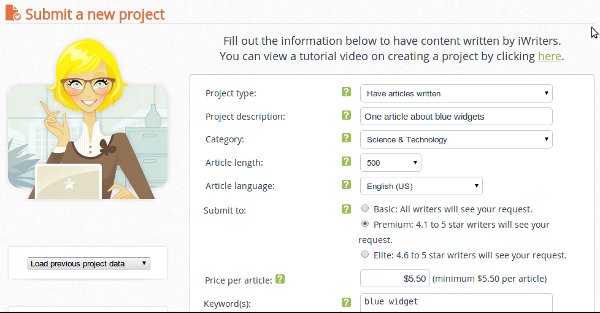
    The other method, one which is suitable for your authority sites if done right, is to outsource to a real human writer or in fact multiple writers. There are many places you can find writers, such as oDesk or even Fiverr but frankly the best place is one which is designed specifically for writers – iWriter. The entire system there is optimized for writers and those of us, probably including you, who are looking to hire writers and it is disarmingly simple to use – the only real danger is you may find yourself hiring more and more writers and getting far too many articles written!

    Hiring writers is not without risk in other places, however with iwriter you can actually reject an article if it does not meet your specifications – there are no questions asked, no arguing, just click a button and it is gone and then your article job is sent back out to the network of writers for another go. This raises an important point – you do not want to be rejecting every article, so how exactly do you make sure to get a good article? It is critically important to approach this the right way because if you fail to specify exactly what you need, the writers will have to guess and will very likely return something which is not up to the standards you expected or may even be totally wrong in terms of subject matter.

    But no need to worry – we’ve been there before and can tell you how you can get good content written with minimum fuss. You have to be very clear about what you want – you also need to be aware that there are different levels of writer: Basic, Premium and Elite. A Basic article goes out to all writers, including those with low ratings and also costs much less – a 500 word article can be had for just $3! But there’s a much higher chance of getting back poor quality, clearly spun articles. A Premium article will only go out to writers with more than 4 stars and a 500 word article will cost you $5.50 – having more than 4 stars doesn’t guarantee you will get good quality back though, you could still get back some borderline gibberish. If you’re really keen you can order an Elite article which will set you back $10 for 500 words and will only be sent to writers with a rating of 4.6 or above. Of course you are not limited to 500 word articles, you can have 150 words or 2000 words, whatever you prefer.

    In fact you don’t have to stop at getting short (or even quite long) articles written – you can go all out and get full-on Kindle ebooks written for you which you could market through Amazon like a ‘proper’ author or on all the many ebook sites out there. Or you could use such ebooks as your signup incentives for your mailing lists – when you can offer a good quality, unique product (ebook) to your site visitors, the chances of getting them to subscribe goes way up.

    The Right Way to Hire a Writer

    To ensure you get a decent article, you should use specifications similar to the following, but of course adapted to your own requirements..

    First of all make it clear that you will reject any article which does not meet your specifications – put such a warning (in your own words) at the top of the specs to make sure the writer will see it. This helps you feel less guilty if you do have to reject one since you clearly warned them of that possibility in advance.

    Secondly, warn them that you will not accept content which is auto-generated.. anything that looks dodgy is probably auto-generated so you must reject that. Note though that it could still be created automatically but then manually edited to make it look like it was all written manually – there’s not much you can do in such a case and as long as it is unique, fully readable, grammatically correct, in native level english and ultimately makes sense, then it doesn’t really matter.

    Thirdly, warn them that you wont accept content which is copied – iwriter runs everything through copyscape for you so it should be unique but still it is worth doing a manual check before accepting an article, just for some extra reassurance. If it turns out to be very similar to an existing article then reject it fast.

    Next you should give some specifications about the structure and content of the article – for example tell them you want 4 paragraphs or 10 paragraphs (depending on article length of course) and even how many sentences you want in each. Doing this helps to ensure you get something which looks substantial and has a side-effect of potentially getting you more words than you paid for.

    Specify the number of times the keyword should appear (an upper limit to prevent keyword stuffing), tell them to include sub-titles, explain the tone they should use (you can select friendly or professional already in the form but you may want to explain further). It can also help to provide some links to sources they can use to get a better understanding of what the article should be about, particularly if it is an obscure or complicated subject that they may otherwise never have heard of or have no expertise in.

    It is also worth saying that you will give them a good rating if they do a good job – and make sure that you do! It helps your reputation as well as theirs which makes it easier for you to hire writers in future. Also consider that when you reject an article it affects your stats on iwriter – everyone can see the percentage of articles you have rejected and nobody wants to waste time writing for someone that ends up rejecting 90%! If you’ve done your part of the job properly (defined the task clearly) then you will be much less likely to have to reject articles, which means you have a low percentage and writers will be more keen to work for you.

    What Next?

    When you’ve found a writer that does a good job – make sure to add that person to your favourites list! This makes it easy to rehire the same person for future jobs – not only do you get a writer who is familiar with your requirements, but they also get paid 5% more for the job while it still costs you exactly the same, so it’s a win-win situation.

    As with the old saying – garbage in, garbage out – if you explain clearly what you want and have realistic expectations (you probably wont get someone with a PhD in astrophysics writing your articles), then you can really get decent quality content out of the system and in a pretty much unlimited supply since you can hire multiple writers in parallel. Using the services of iWriter, there is now nothing stopping you from building that massive authority site you’ve been procrastinating over for so long – get it out there, fill it with great content with almost no effort on your part (besides keyword research) and start raking in the money!

    What are you waiting for? Hire some writers now!!